

Welcome to our guide on registering for corporate tax in the UAE. Starting in 2022, the UAE set up a federal corporate tax for all businesses, even those in free zones.The corporate tax rate is 9% for profits over AED 375,000. If your profits are up to AED 375,000, the tax rate is 0%. It's important for businesses to register for corporate tax to avoid fines and make the most of tax benefits.
The Federal Tax Authority (FTA) has created the EmaraTax portal. This platform is easy to use and safe. You can register, file tax returns, and make payments all in one place. In this guide, we’ll take you step-by-step through the process of registering for corporate tax on the EmaraTax portal. Let's get started!
Understanding the UAE Corporate Tax System
Taxable persons must first register for Corporate Tax with the FTA, and once registered they are required to file Corporate Tax returns within nine months of the end of their respective tax period. The deadline applies to the payment of Corporate Taxes due for the relevant tax period.
Taxable individuals or independent partnerships are required to register for corporate tax and obtain a Tax Registration Number (TRN) as soon as they become taxable entities. The standard Corporate Tax rate is 9% for taxable income above AED 375,000, with a 0% rate for earnings up to AED 375,000.
The primary objectives of corporate tax in the UAE include positioning the emirate as a global business hub, stimulating growth, and meeting international standards in tax transparency.
Who Needs to Register for Corporate Tax in Dubai ?
All persons subject to Corporate Tax must register with the Federal Tax Authority on the EmaraTax platform; natural persons with business turnover exceeding AED 1 million in a calendar year must also register. The corporate tax rate is 0% for income up to AED 375,000 and 9% for income above AED 375,000.
How to Register for Corporate Tax in UAE ? A Step-by-Step Guide
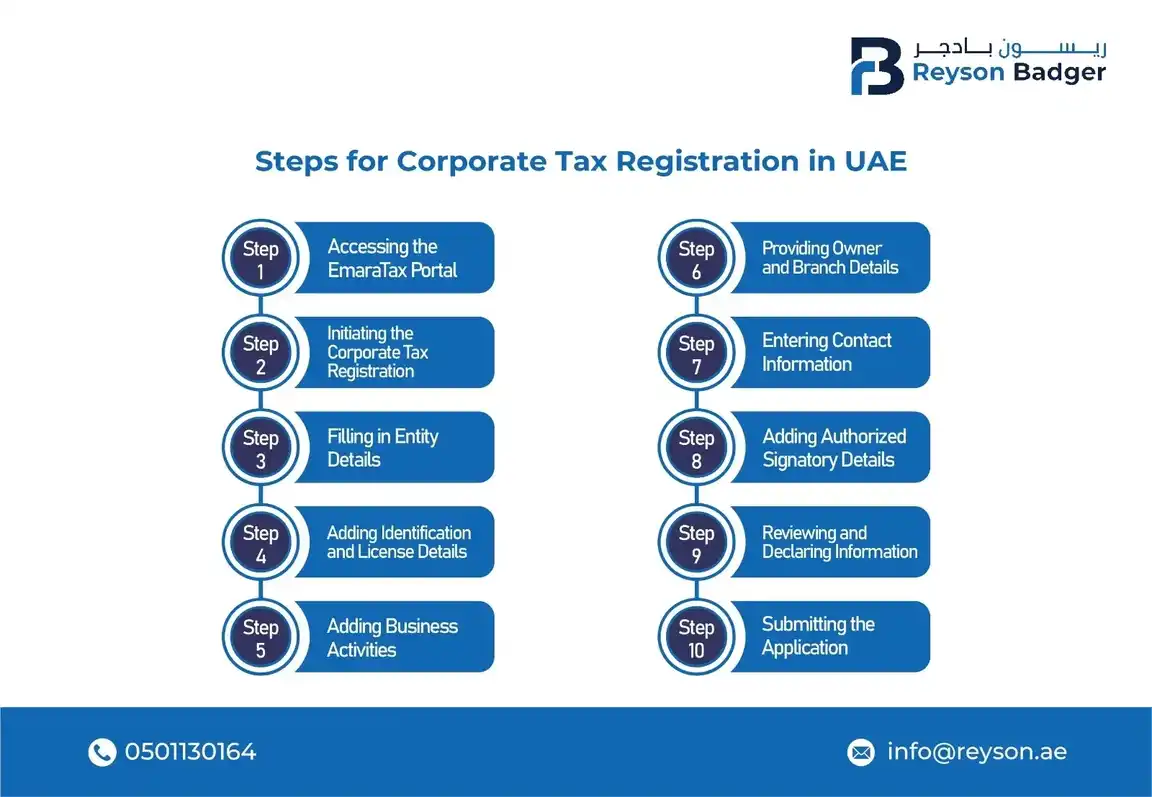
Step-by-Step Guide to Register for UAE Corporate Tax in EmaraTax
After logging into the EmaraTax portal and creating/viewing your taxable person, you must read the instructions and guidelines and mark the checkbox on the ‘Instructions and Guidelines’ page before clicking ‘Start’ to proceed with the five‑section Corporate Tax registration application.
The process of logging into the EmaraTax portal, registering information, and obtaining the Corporate Tax registration number is simple. It is very easy to register, and if you have any issues regarding the registration process, please do not hesitate to contact Reyson Badger. Let's discuss every step in detail:
Step 1:
Log in to EmaraTax, the online tax portal operated by the Federal Tax Authority. You may use your login credentials or the UAE Pass to accomplish this. Alternatively, if you do not have an EmaraTax Account, you may create one by clicking Sign Up, or if you have forgotten your password, click Forget Password. If you prefer, you may log in via UAE Pass, which will take you to the UAE Pass Page and then to the Corporate Tax Dashboard.
Step 2:
It is important to verify whether any taxable persons are linked to your EmaraTax profile. If there is no taxable person associated with your account, you will need to add one. To create a new taxable person, please enter the required details and click Create. Once you have created one, the taxable person can be viewed on the list.
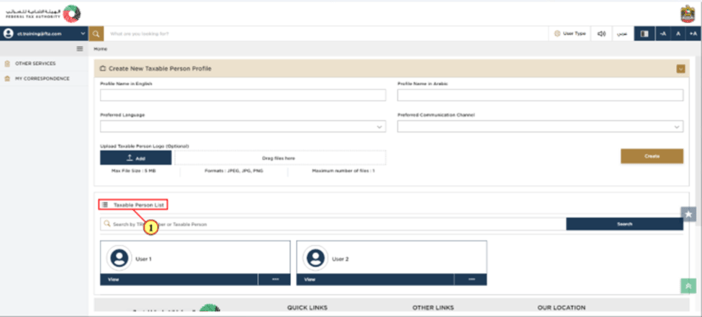
Step 3:
Check the taxable person, and click view to open the Corporate Tax Dashboard.
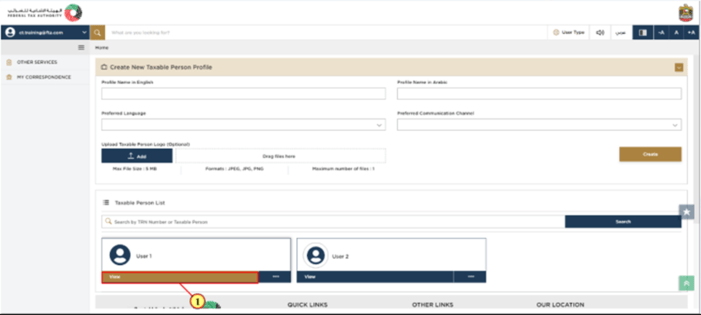
Step 4:
The Corporate Tax Registration in UAE Dashboard is now visible to you. To begin the Corporate Tax Registration process, click Register on the Corporate Tax tile. As soon as you click Register, you will see the instructions and guidelines for the Corporate Tax Registration process. Please read the instructions carefully and tick the check box.
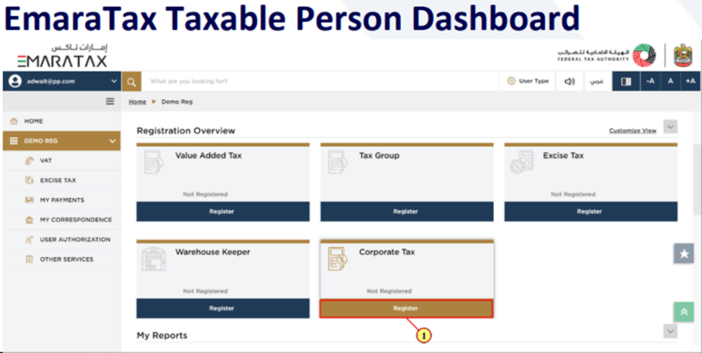
Step 5:
Click Start to begin the Corporate Tax Registration Process.
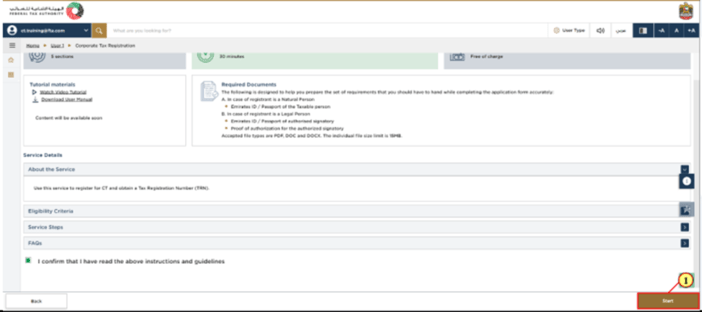
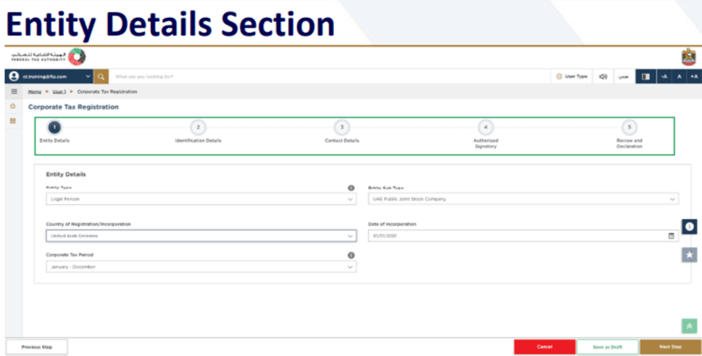
There are five sections in the registration application. As can be seen in the image below, it represents a progress column. The section that you are currently in would be indicated in blue. By the time you reach the next section, the completed section would be represented in green. The mandatory fields of the present section must be completed in order to move from one section to another (except for the optional fields). In order to avoid rejection of your application, please ensure that all documents you submit cross-verify the information you entered in the application.
Step 6:
You may select your firm's entity type under the Entity Details Section. It is important to note that all input fields vary depending on the entity you choose.
Note: By clicking "Save as Draft", you can save the information you entered and return later to complete the Corporate Tax Registration Process. Alternatively, you may click "Cancel" to cancel the registration process.
Step 7:
As soon as you have completed all the required fields on the "Entity Section", click "Next Step" to proceed to the "Identification Details" section. In the Identification Section, you are required to enter the details of the "Trade License" according to the selected entity.
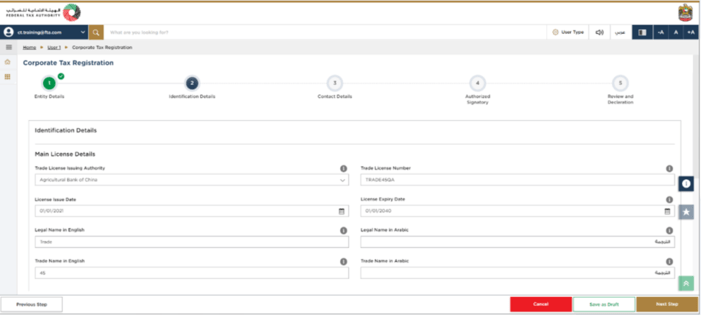
Trade License is not applicable for the following Entity Subtypes.
- Natural Person - Partnership or Heir
- Legal Person - Foreign Business
- Legal Person - Federal UAE Govt. Entity
- Legal Person - Emirate UAE Govt. Entity
Step 8:
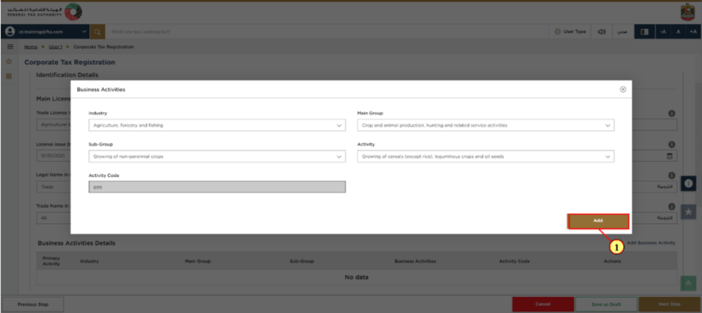
Add all the business activities involved within the Trade License by clicking "Business Activity".
Step 9:
Click "Add" after entering all of the required "Business Activity" information. There will be an Activity Code displayed on the screen.
Step 10:
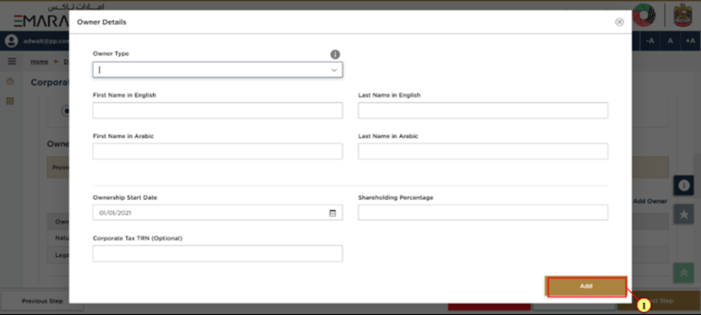
You can enter all the owners associated with the Trade License by clicking on "Add Owners". Enter the required information about the owner and click "Add". (The owner may be a natural person or a legal person).
Step 11:
Click "Yes" if you have "one or more" branches in the UAE. Enter the "Trade License Details", the "Business Activities", and the "List of Owners" for each branch.
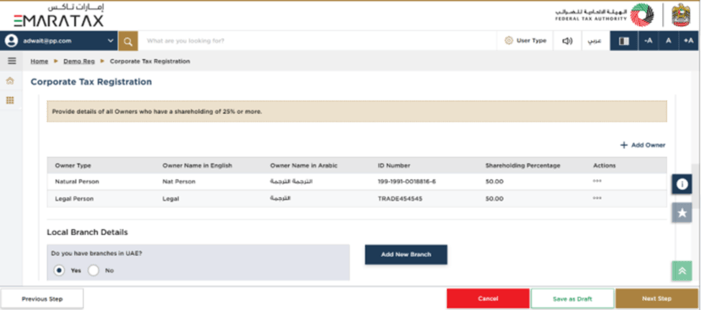
Note: It is intended that the registration will be made in the name of the "Head Office" meeting the selected criteria. In spite of the fact that the branches are located in more than one Emirate, only one Corporate Tax Registration is required.
Step 12:
After entering the necessary details click on “Next Step” and move-on to the Contact-Details Section.
Step 13:
Enter the details of the registered address of the business.
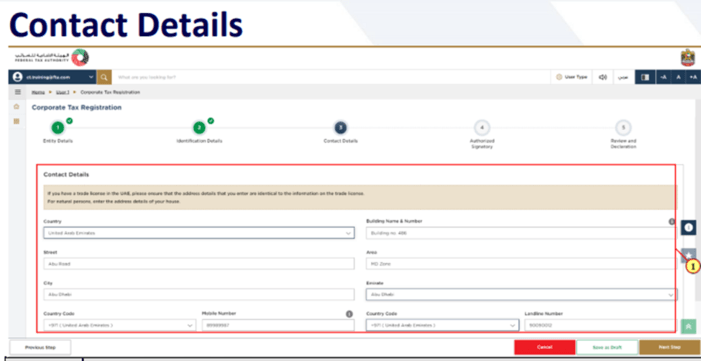
Note: Do not include the address of another business or individual (such as your accountant's address). In the case of multiple addresses, include the address where your day-to-day activities are performed.
Step 14:
Click on "Next Step" once you have entered all the required details to proceed to the "Authorized Signatory" section.
Step 15:
By clicking "Add Authorized Signatory", you can enter the details of the authorized signatory. If necessary, you may add one or more authorized signatories.
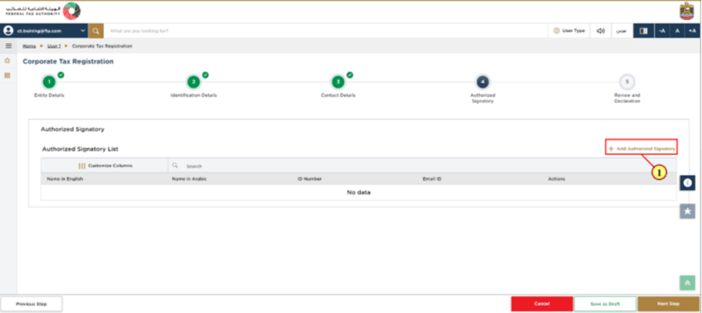
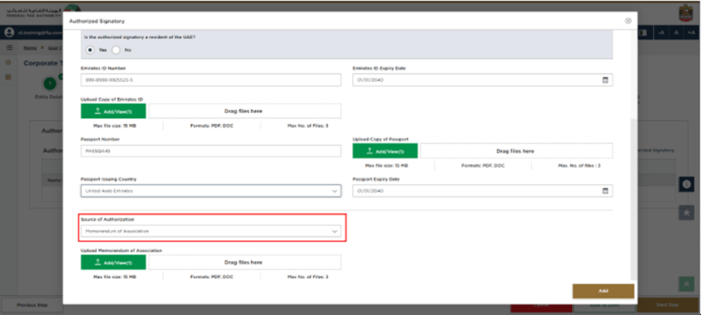
If a legal person is involved, a "Power of Attorney" or a “Memorandum of Association” may be required as a source of authorization.
Step 16:
Once the authorized details have been entered, select "Add".
Step 17:
To proceed to the "Review and Declaration" section, select "Next Step" after filling out the necessary information. In this section, you will review and declare all the information that you entered throughout the application.
Step 18:
Once the application has been reviewed, tick the checkbox to declare it
Step 19:
To proceed with the Corporate Tax Registration Application, select "Submit".
Once your application has been registered, the Federal Tax Authority (FTA) issues a Tax Registration Number (TRN). Please note this reference number in case you need to communicate with the FTA in the future.
Post Application Submission
Potential outcomes after submission:
- Approval : Your Corporate Tax Registration application may be approved if all information is correct and meets the necessary criteria. You will receive confirmation from the Federal Tax Authority (FTA).
- Rejection : In case of any errors, missing information, or failure to meet the required standards, your application may be rejected. You will be notified of the reason for rejection and may need to make corrections before resubmitting.
- Request for Additional Information : The FTA may request additional details or documents to complete the review of your application. Ensure you respond promptly and accurately to avoid delays.
- Notifications and Updates : You will receive notifications regarding the status of your application, including approvals, rejections, or requests for further information. Keep an eye on your communication channels to stay updated on any changes.
Leading Tax Consultant in UAE
Tax consultants in the UAE play a vital role in facilitating a smooth registration process. They ensure all necessary documents are in order, guide through the registration process, and provide assistance in tax planning and compliance.
In conclusion, registering for corporate tax in the UAE is a vital step for businesses, and seeking professional assistance can simplify the process and ensure compliance with UAE tax laws.
As a leading corporate tax consultants in Dubai, Reyson Badger can simplify the corporate tax registration process for businesses. Our expert team ensures a seamless and hassle-free experience, guiding you through every step to guarantee compliance with UAE tax regulations. Reach out to Reyson Badger for more.